
Running multiple A/B tests at the same time: when and how
Most A/B tests can share a site. Learn which pairs interact, what overlap, exclusion and running in sequence cost in weeks, and how to plan a testing calendar.
Running multiple A/B tests at the same time is safe for most pairs of tests. Each visitor just has to be assigned to each test at random. The pairs that need a plan are the ones that touch the same element, the same page or funnel step, or the same primary metric. For those, you choose between letting the tests overlap and checking afterward, making them mutually exclusive, or running them one after the other.
Each choice costs something different. Overlap is the fastest. Mutual exclusion and running in sequence take about twice as long on the same traffic, because each test still needs the same number of visitors.
Can you run several A/B tests at once on one site?
Yes, and concurrent A/B tests are the usual setup at Microsoft’s Experimentation Platform, which runs hundreds of tests every day. Its team explains that giving each test its own users would “dramatically decrease the statistical power of each test”. Instead, each user can be in several tests at once.
That works because assignment is independent. A visitor’s group in one test says nothing about their group in another.
With two tests of two variants each, visitors spread evenly over four combinations: A and A, A and B, B and A, B and B. Each test’s result is an average over the other test’s groups. That average treats both variants fairly unless the two changes interact.
Microsoft’s team checked how often that happens (Microsoft Research). They took four major products, each running hundreds of tests a day, and compared every pair of tests running on one day. Three products showed no interactions at all.
The fourth showed abnormal results in 0.002% of test-pair metrics. In none of those were the two effects both significant and pointing in opposite directions.
That evidence covers Microsoft’s products and tests, not your site. The team itself suggests running your tests at the same time and checking your own pairs for interactions. Simultaneous experiments are the normal case. The work is in spotting the few pairs that can interfere.
When two tests interact and when they don’t
Two tests interact when one test’s result depends on which group the visitor is in for the other test. This is called an interaction effect. Microsoft’s example is two ad tests, one turning the text red and one turning the background red. Each change may work alone, but together “the user can no longer see the ad text when it’s red on red”.
Optimizely’s documentation names the same risk factors. Interaction is more likely for two experiments on the same flow, such as a checkout funnel or multi-step form. Tests on different areas of the site, or with different goals, are less likely to interact (Optimizely docs).
The overlap between two tests sorts them into a few cases:
| Overlap | Example pair | Interaction risk | Usual plan |
|---|---|---|---|
| Same element | Two tests on one button | Can’t overlap | One at a time |
| Same page, same metric | Gallery and delivery line, both on add to cart | Possible | Overlap and check, or in sequence |
| Same funnel, later step | Product page and checkout tests | Lower | Overlap, check if it matters |
| Site-wide change | New header on every page | Touches every test | Run alone or exclusive |
| Different pages and metrics | Pricing page and blog sign-up | Low | Overlap |
The first row is a build problem before it’s a statistics problem. Two tests that rewrite the same button can’t both show their version to the same visitor. One overwrites the other.
A shared primary metric needs the same care. Two changes on one page that both aim at the add-to-cart rate can add up, cancel out or compete for the same click. If the metric itself isn’t settled yet, start with how to choose an A/B test primary metric.
A site-wide change sits under every other test at once. Run it alone or keep its visitors out of the other tests. Then watch the guardrail metrics for every A/B test that a broad change can hurt.
Three ways to run two tests on one page
You have three options for two tests that might interact. Each one is described below in the same order: how visitors are assigned, what it costs and when to choose it.
Overlapping experiments. Each visitor is assigned to each test independently, so every visitor counts in both tests. Both tests get all the page’s traffic and finish as fast as one test alone. You can also check for an interaction afterward, because all four combinations exist. Choose it by default, and for any pair from the lower rows of the table.
Mutually exclusive experiments. Visitors are split between the tests first, so each visitor sees at most one of them. No combination is ever shown, which removes the interaction risk. With two tests, each gets half the traffic, so both take about twice as long. Choose it for a pair that could break the page or mislead you, when you need both answers by the same date.
In sequence. Test 1 runs on all traffic, then test 2 starts. Each test runs as fast as a single test, but the second answer comes after both have run. Test 2 also runs on the page as test 1 left it. Choose it when the first result changes what the second test should be.
Statsig’s own guidance is to run overlapping experiments (Statsig). Optimizely’s documentation warns that mutually exclusive experiments add implementation effort and “can significantly slow down your testing cycle”.
The platforms below each document a setting for the exclusive option, under its own name. Optimizely calls it an exclusion group. GrowthBook uses namespaces, where each experiment takes a range of values and ranges that don’t overlap never share a user.
| Platform | Name in its docs | What its docs say |
|---|---|---|
| Optimizely Web Experimentation | Exclusion groups | Keep tests in the group from first start to last finish |
| GrowthBook | Namespaces | Same assignment attribute for every test in it |
| Statsig | Layers | One experiment per layer for each user |
| Amplitude Experiment | Mutual exclusion groups | Add tests before they start running |
| LaunchDarkly | Layers | Tests in one layer never share traffic |
The docs agree on timing. Amplitude says to add experiments to a mutual exclusion group before they start (Amplitude docs). As of November 2026, it lists the groups as an add-on on its Growth and Enterprise plans. Optimizely warns against removing running experiments from a group or reallocating traffic mid-test.
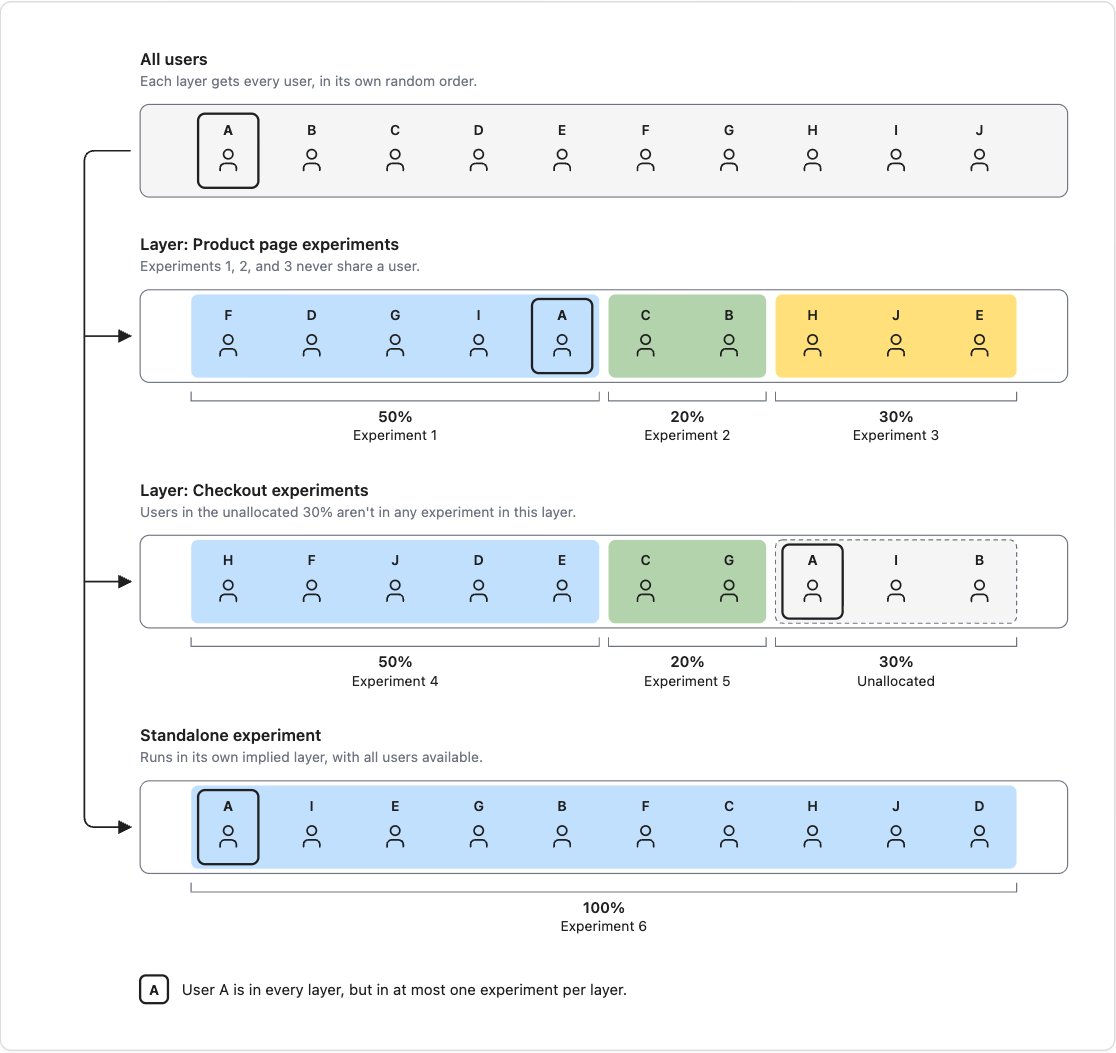
Exclusion also has a scope. In Statsig, every user is in every layer, so a user can still be in one experiment from each layer at once (Statsig docs). LaunchDarkly gives the example of a checkout layer for all checkout tests (LaunchDarkly docs). Exclusion protects only the tests you put in the same group.
Hypothetical example: two tests on one product page
This hypothetical example puts numbers on the three plans, and every input is made up. A product page gets 7,500 visitors a week, and 10.0% of them add to cart.
Two tests are ready. Test 1 changes the photo gallery. Test 2 adds a delivery date line under the price. Both use add-to-cart rate as the primary metric.
The smallest lift worth detecting is 10% relative, from 10.0% to 11.0%. At 95% confidence and 80% power, one test needs 14,749 visitors per variant.
That makes 29,498 visitors per test. At 7,500 a week, that’s 3.9 weeks, so one test runs 4 full weeks.
| Plan | Visitors per test each week | Weeks until both answers | Can you check the pair |
|---|---|---|---|
| In sequence | 7,500 | 8 | No |
| Overlapping | 7,500 | 4 | Yes |
| Mutually exclusive | 3,750 | 8 | No |
Note: weeks rounded up to full weeks (7.9, 3.9 and 7.9 before rounding). Sample size from the normal approximation for two proportions.
Overlap gives both answers in half the time. Running in sequence and making the tests exclusive cost the same 8 weeks. Each test still needs its 29,498 visitors, and the page only has so many.
Cutting the exclusive plan short doesn’t save the time. Stopped after 4 weeks, each exclusive test has 7,500 visitors per variant.
With that sample, the smallest detectable lift grows from 1.0 to 1.4 percentage points, or from 9.7% to 13.7% relative. That’s 1.41 times larger, the square root of 2.
The conclusion depends on the ratio, not on these exact inputs. Changing the traffic and the smallest lift, with everything else fixed, gives the same pattern:
| Weekly visitors, smallest lift | One test or overlapping | In sequence | Mutually exclusive |
|---|---|---|---|
| 7,500, 10% relative | 3.9 weeks | 7.9 weeks | 7.9 weeks |
| 7,500, 5% relative | 15.4 weeks | 30.8 weeks | 30.8 weeks |
| 20,000, 10% relative | 1.5 weeks | 2.9 weeks | 2.9 weeks |
| 20,000, 5% relative | 5.8 weeks | 11.6 weeks | 11.6 weeks |
Note: weeks to one decimal place, before rounding up to full weeks. Every figure comes from the saved script example.py.
A low-traffic page feels the doubling most. With a 5% lift on the smaller page, two answers take about 31 weeks instead of about 15.
How to check for an interaction after the test
The check uses the four combinations that overlapping tests create. It asks whether test 1’s lift is different for visitors in test 2’s Variant A and in its Variant B. Count people by the group they were assigned to in each test, not by whether they noticed the change.
- Split test 1’s results by test 2’s assigned group.
- Compute test 1’s lift, Variant B minus Variant A, inside each of those two groups.
- Compare the two lifts and test whether the difference is larger than chance would explain.
- If you check many pairs, correct for multiple comparisons. Microsoft’s team used a Benjamini-Hochberg correction across its pairs.
- Decide before launch what you’ll do if you find one, such as rerunning the pair as an exclusive test.
Some platforms run this check for you. Statsig’s Interaction Detection lets you pick two experiments and see whether people exposed to both behave differently from people exposed to only one.
The check has limits worth knowing before you rely on it. In the hypothetical example above, each of the four combinations has about 7,500 visitors after 4 weeks. At that size, the smallest interaction the check can detect is 1.9 percentage points. That’s 1.9 times the 1.0 point lift each test was sized to find.
So a clean check rules out a large interaction, not a small one. Microsoft’s team makes the same point about its own data: some interactions may have gone unseen for lack of power. A reversal, where one change turns the other’s lift negative, needs an interaction larger than the lift itself. In this example, a 1.0 point lift that flips to minus 1.0 point is a 2.0 point interaction, barely above what the check can detect.
The check also says nothing about why two changes interact, and it can’t help the other two plans. Exclusive tests and tests in sequence never show both changes to the same visitor. If you want to know how two changes work together, that’s a test of the combination itself.
Plan a testing calendar across pages
A testing calendar decides which tests share each week, page by page. If you need ideas first, see how to find A/B test ideas on a single page. Then sort the list with a few rules:
- One test per element at a time. Two tests can’t own the same button, headline or price.
- Different elements on one page can overlap. Preview all four combinations first. Overlap only if none of them breaks the page or reads oddly.
- Same page and same primary metric: overlap and check, or wait. Wait when the first result could change the second test.
- Site-wide changes run alone, or as an exclusive group with the tests they touch.
- Set exclusion before launch and run full weeks. Start and stop on the same weekday so each test covers whole weekly cycles.
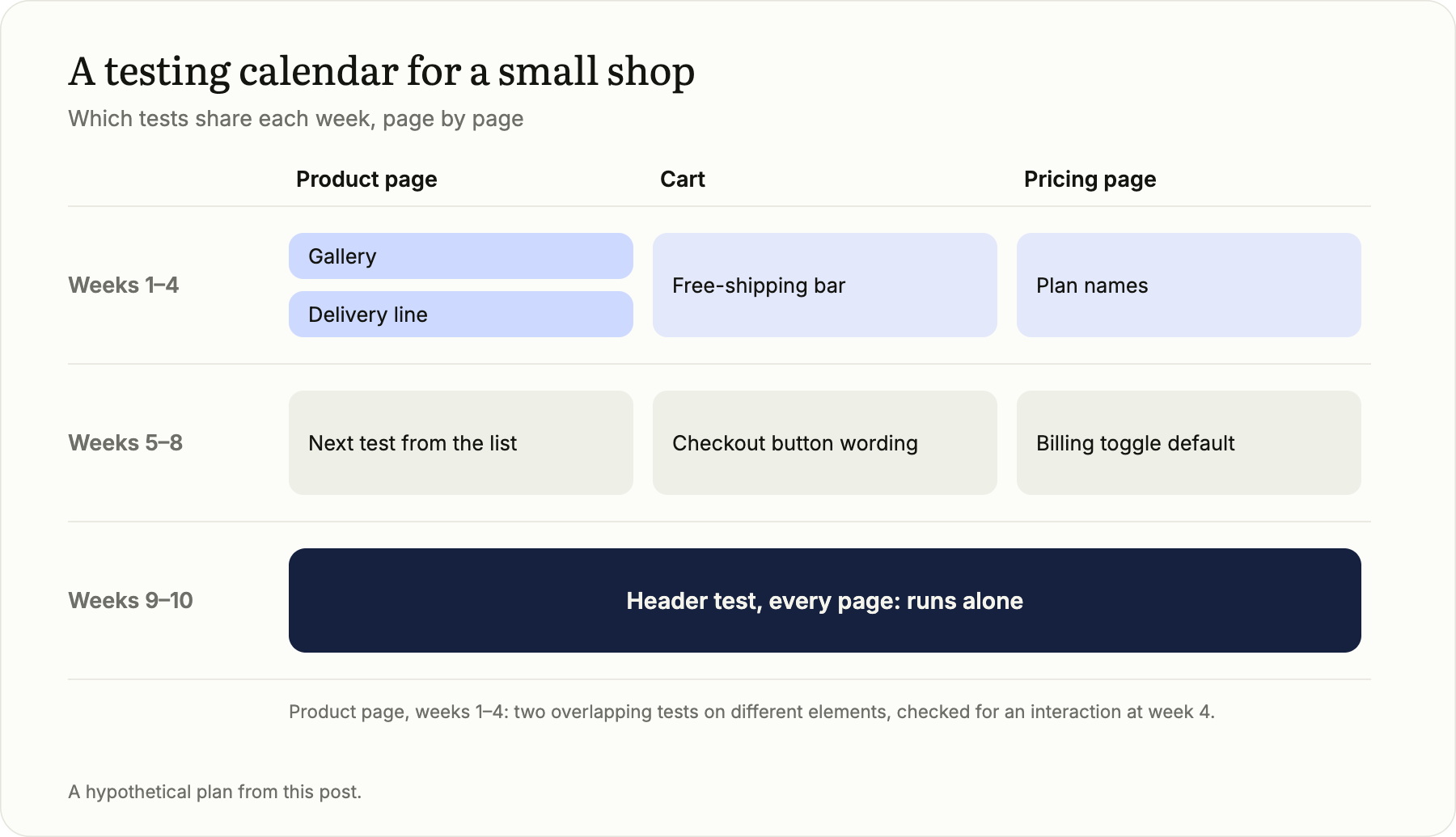
The calendar below applies those rules to a small shop with three pages, and it’s a hypothetical plan:
| Weeks | Product page | Cart | Pricing page |
|---|---|---|---|
| 1 to 4 | Gallery and delivery line, overlapping | Free-shipping bar | Plan names |
| 5 to 8 | Next test from the list | Checkout button wording | Billing toggle default |
| 9 to 10 | Header test only | Header test only | Header test only |
The product page runs two overlapping tests because they change different elements. They share a primary metric, so the pair gets an interaction check at week 4. The cart test overlaps with them too, since it sits at a later funnel step with its own metric. The header test in weeks 9 and 10 changes every page, so it runs alone.
Optimize Peak returns up to four single-change tests for one page, ranked by priority. That ranking is a natural queue for one column of the calendar: run the top test, then the next. When two of them change different elements and their combinations look fine, they can overlap. Optimize Peak doesn’t see your traffic, so the weeks in each cell are still yours to work out.
Next step: map your running tests
List every test that’s live or ready, with its page, element and primary metric. Mark any pair that shares an element, a page and metric or a funnel step. Give each marked pair a plan from the overlap table. To fill the rest of the calendar, the free first scan ranks up to four tests for one page screenshot.